MEPCO consumers across southern Punjab — Multan, Bahawalpur, Rahim Yar Khan, D.G. Khan, Vehari, Sahiwal and other districts — can view their electricity bill online using the reference number. This saves a trip to the office when a bill is lost or delayed, especially in rural areas where paper bills can arrive close to the due date.
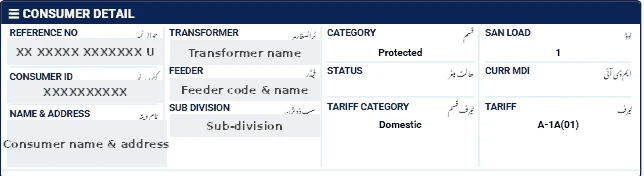
Where to find the MEPCO reference number
The reference number is printed at the top of the bill. It has 14 digits, sometimes shown in groups with a letter (U for urban or R for rural) at the end. Enter only the digits. If you have no old bill, ask a neighbour on the same feeder for the format, then contact your MEPCO sub-division with your CNIC to get your own number.
How to check the MEPCO bill
- Open our bill checker.
- Select MEPCO.
- Enter the 14 digits and press Check Official Bill.
- The official PITC MEPCO page opens your bill, which you can print or save.
Reading the bill after you open it
- Compare units with the same month last year in the history table.
- Check whether a detection or arrears amount has been added.
- For agricultural tube-wells (D tariff), confirm the tariff and any relief package shown.
- Note the due date — late payment adds a surcharge.
If the bill does not open
- Check that you entered exactly 14 digits, without spaces or the letter at the end.
- Make sure you selected the correct company — a reference number from one DISCO will not work on another DISCO's page.
- The official portal may be slow near due dates; try again after a few minutes.
- A new connection may not appear until its first bill is issued.
Ways to pay the bill
- Mobile banking and internet banking apps of most Pakistani banks (search for the electricity company under "Utility Bills").
- Mobile wallets such as JazzCash and Easypaisa.
- Bank branches and post offices before the due date.
Always keep the payment confirmation or stamped receipt until the next bill shows the amount as paid.
Tips for MEPCO consumers
- Rural feeders may have reading delays; a 35-day reading period means more units. Report unusual readings quickly.
- Keep separate records for domestic and tube-well connections.
- For complaints, call 118 or visit the sub-division with your bill and CNIC.
See our MEPCO bill calculation guide for a line-by-line explanation of charges.