You can view, download and print your LESCO electricity bill online in less than a minute. This is useful when the paper bill is lost, arrives late, or when you want to check the amount and due date before paying. LESCO serves Lahore, Kasur, Sheikhupura, Nankana Sahib and Okara.
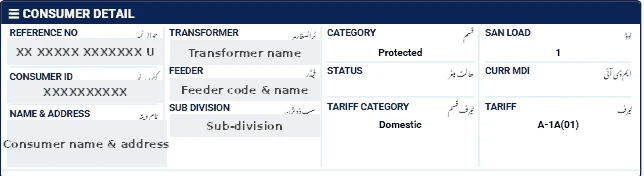
What you need
Only your 14-digit reference number. It is printed near the top of every LESCO bill, usually under the heading "Reference No". Some bills show it with spaces (for example, 2 digits, 5 digits and 7 digits) followed by a letter such as U or R — enter only the 14 digits.
Steps to check your LESCO bill online
- Open our bill checker and choose LESCO from the list.
- Type your 14-digit reference number.
- Press Check Official Bill. You will be taken to the official PITC LESCO bill page.
- Your current bill opens. Use your browser's print option to print or save it as PDF.
Online Bijli Bill Check does not store your number; we only check its format and send you to the official page.
What to check on the duplicate bill
- Amount payable within due date and after due date.
- Units consumed and the 12-month history — a sudden jump may mean a reading error or a change of slab.
- Arrears — make sure previous payments are reflected.
- Tariff — A-1 for homes, A-2 for shops and offices.
For a full explanation of every charge, read our LESCO bill calculation guide.
If the bill does not open
- Check that you entered exactly 14 digits, without spaces or the letter at the end.
- Make sure you selected the correct company — a reference number from one DISCO will not work on another DISCO's page.
- The official portal may be slow near due dates; try again after a few minutes.
- A new connection may not appear until its first bill is issued.
Ways to pay the bill
- Mobile banking and internet banking apps of most Pakistani banks (search for the electricity company under "Utility Bills").
- Mobile wallets such as JazzCash and Easypaisa.
- Bank branches and post offices before the due date.
Always keep the payment confirmation or stamped receipt until the next bill shows the amount as paid.
Lahore-specific tips
- In summer many Lahore households cross 200 units, so checking the bill early helps you plan AC use for the next month.
- If you have rooftop solar, your online bill shows import and export units — compare them with your green meter.
- For complaints, call 118 or visit your LESCO sub-division office.