IESCO consumers in Islamabad, Rawalpindi, Attock, Jhelum and Chakwal can view their electricity bill online using the 14-digit reference number. This is especially helpful for tenants, overseas Pakistanis paying bills for family, and anyone whose paper bill was lost.
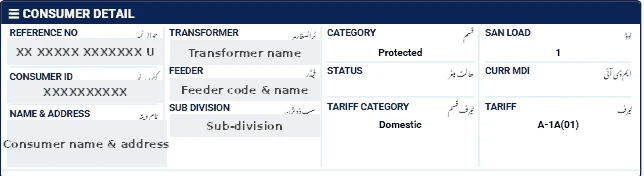
What you need
The reference number from an old IESCO bill — 14 digits, printed at the top. If the bill shows a letter at the end, leave it out.
Note: residents of some private housing societies receive electricity through a bulk connection and get a bill from the society, not from IESCO. Those bills are not available on the PITC portal; contact your society's office.
How to check
- Open our bill checker and select IESCO.
- Enter your 14-digit reference number.
- Click Check Official Bill. The official PITC IESCO page opens.
- Print the bill or save it as PDF for your records.
Reading an IESCO bill
- TOU meters: homes with 5 kW or more sanctioned load are billed by peak and off-peak units. Check both readings.
- Solar homes: the bill shows import and export units. Make sure the export reading has been recorded.
- Arrears and adjustments: confirm last month's payment has been credited.
If the bill does not open
- Check that you entered exactly 14 digits, without spaces or the letter at the end.
- Make sure you selected the correct company — a reference number from one DISCO will not work on another DISCO's page.
- The official portal may be slow near due dates; try again after a few minutes.
- A new connection may not appear until its first bill is issued.
Ways to pay the bill
- Mobile banking and internet banking apps of most Pakistani banks (search for the electricity company under "Utility Bills").
- Mobile wallets such as JazzCash and Easypaisa.
- Bank branches and post offices before the due date.
Always keep the payment confirmation or stamped receipt until the next bill shows the amount as paid.
Paying from abroad
Overseas family members can pay through Pakistani bank apps or wallets linked to a Pakistani account. Save the transaction ID with the reference number.
Complaints
Call 118 or visit your IESCO sub-division. For a breakdown of charges, see our IESCO bill calculation guide.