HESCO serves Hyderabad and southern Sindh outside Karachi — including Thatta, Badin, Mirpurkhas, Tharparkar and Sanghar. You can check your HESCO bill online with the 14-digit reference number, which is useful when paper bills arrive late in rural areas.
Karachi residents are supplied by K-Electric, which has a separate billing system; HESCO's page will not show K-Electric bills.
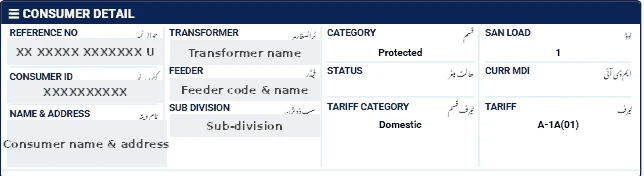
Where is the reference number?
On the top part of your HESCO bill. It has 14 digits and may end with a letter — enter only the digits.
Steps to check
- Open our bill checker and select HESCO.
- Enter your 14-digit reference number.
- Click Check Official Bill to open the official PITC HESCO page.
- View, print or save the bill as PDF.
What to verify
- Reading date and units: if the bill is based on an average or estimated reading, request a correction with a meter photo.
- Arrears: check that last month's payment is reflected.
- Tariff and load: homes should be on A-1, shops on A-2.
If the HESCO bill does not open
- Enter exactly 14 digits, without spaces or the final letter.
- Make sure HESCO is selected; a reference number works only on its own company's page.
- The official portal can be slow near due dates — try again after a few minutes.
- New connections appear only after the first bill is issued.
Ways to pay the bill
- Mobile banking and internet banking apps of most Pakistani banks (look under "Utility Bills" → "Electricity").
- Mobile wallets such as JazzCash and Easypaisa.
- Bank branches and post offices before the due date.
Keep the payment confirmation until the next bill shows the amount as paid.
Tips for HESCO consumers
- Take a photo of your meter each month around the reading date.
- Keep paid bills for at least a year.
- Call 118 for faults and visit your sub-division for billing issues.
Our HESCO and SEPCO bill calculation guide explains every charge.