GEPCO consumers in Gujranwala, Sialkot, Gujrat, Narowal, Mandi Bahauddin and Hafizabad can check their electricity bill online with the reference number. Whether you run a workshop in Sialkot or live in a Gujranwala home, viewing the bill online lets you confirm the amount and due date immediately.
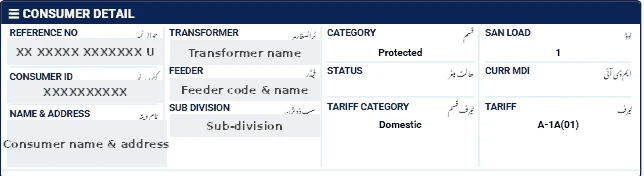
Find your reference number
It is printed at the top of your GEPCO bill and has 14 digits. Ignore any spaces and the letter at the end.
Steps to check your GEPCO bill
- Open our bill checker and select GEPCO.
- Enter your 14-digit reference number.
- Click Check Official Bill to open the official PITC GEPCO page.
- View, print or save the bill as PDF.
What to look at on the bill
- Units and history: compare with previous months to spot unusual jumps.
- Tariff: small factories should be on an industrial tariff, not commercial.
- Peak/off-peak units if you have a TOU meter.
- Taxes: if you are a filer or sales-tax registered, make sure this is reflected so extra taxes are not charged.
If the GEPCO bill does not open
- Enter exactly 14 digits, without spaces or the final letter.
- Make sure GEPCO is selected; a reference number works only on its own company's page.
- The official portal can be slow near due dates — try again after a few minutes.
- New connections appear only after the first bill is issued.
Ways to pay the bill
- Mobile banking and internet banking apps of most Pakistani banks (look under "Utility Bills" → "Electricity").
- Mobile wallets such as JazzCash and Easypaisa.
- Bank branches and post offices before the due date.
Keep the payment confirmation until the next bill shows the amount as paid.
Tips for GEPCO consumers
- Workshops can save by running machines outside peak hours.
- Homes should try to stay at 200 units or less in moderate months to keep protected status.
- For complaints call 118 or visit your GEPCO sub-division.
Read our GEPCO bill calculation guide for a full breakdown of charges.