FESCO consumers in Faisalabad, Jhang, Toba Tek Singh, Chiniot, Sargodha, Khushab, Mianwali and Bhakkar can check their electricity bill online with a reference number. For shop owners and power-loom operators, checking the bill online is the fastest way to confirm the amount and plan payment before the due date.
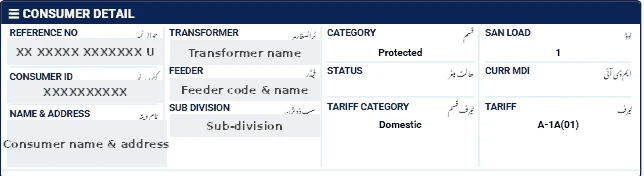
Finding your FESCO reference number
Look at the top section of any previous FESCO bill. The reference number has 14 digits. It may appear with spaces and a final letter (U or R); type only the 14 digits. Do not confuse it with the customer ID or meter number, which are different.
Steps
- Go to our bill checker and select FESCO.
- Enter your 14-digit reference number.
- Click Check Official Bill to open the official PITC FESCO page.
- View, print or save the bill as PDF.
Industrial and commercial consumers
If your connection has a time-of-use meter, the online bill shows peak units and off-peak units separately, plus MDI (maximum demand) for larger connections. Check:
- That peak and off-peak readings match the meter display.
- That your sales tax registration (STRN) appears if you are registered — otherwise further tax may be applied.
- Income tax lines, which can be adjusted in your annual return if you are a filer.
If the bill does not open
- Check that you entered exactly 14 digits, without spaces or the letter at the end.
- Make sure you selected the correct company — a reference number from one DISCO will not work on another DISCO's page.
- The official portal may be slow near due dates; try again after a few minutes.
- A new connection may not appear until its first bill is issued.
Ways to pay the bill
- Mobile banking and internet banking apps of most Pakistani banks (search for the electricity company under "Utility Bills").
- Mobile wallets such as JazzCash and Easypaisa.
- Bank branches and post offices before the due date.
Always keep the payment confirmation or stamped receipt until the next bill shows the amount as paid.
FESCO help
For faults call 118. For billing corrections, visit your FESCO sub-division with the bill, CNIC and a dated meter photo. Our FESCO bill calculation guide explains each charge in detail.